Certificates
On the Certificates page, you can add CA certificates to be used with the action command's email sending function (SMTPS, STARTTLS).
This product comes with certificates from major public CAs, but if the certificate of your mail server cannot be verified with the included CA certificates, you can add a CA certificate of your choice by uploading it on this screen.
NoteOnly certificates added by the SNMP Plug-in administrator can be managed on this screen. Certificates included with the product are not displayed and cannot be deleted.
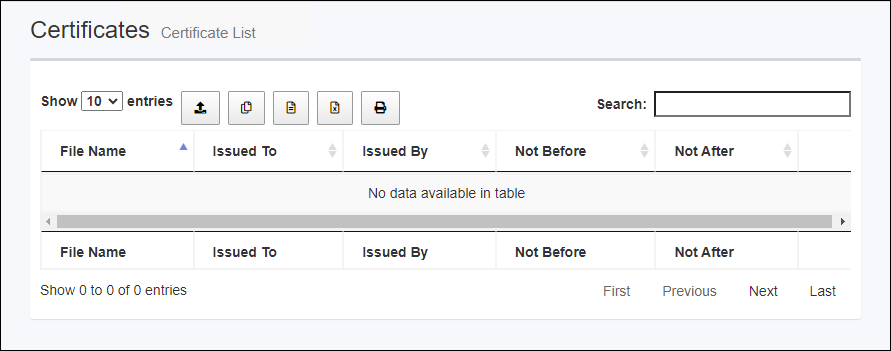
| Item Name | Description |
|---|---|
| Number of items displayed on the page | Lets you select a number of certificates displayed on a single page. |
 Upload |
Upload the certificate file. You can select multiple certificate files. |
 Copy to Clipboard |
Copy the certificate file to your clipboard. You can filter target subnets with "Search" box. "Number of items on the page" and the current page do not affect an output. |
 Export to CSV file |
Download the registered certificate file as a CSV (comma separated values) file. You can filter target subnets with "Search" box. "Number of items on the page" and the current page do not affect an output. |
 Export to Excel |
Download the registered certificate file as an Excel workbook (extension: xlsx, Microsoft Excel 2007 or later) file. You can filter target subnets with "Search" box. "Number of items on the page" and the current page do not affect an output. |
 |
Displays a list of registered certificate files in a pop-up window or new tab of the Web browser and displays a print dialog. You can filter target subnets with "Search" box. "Number of items on the page" and the current page do not affect an output. |
| Search field | Lets you filter target subnets by keywords. The search ignores case. "." and "/" in the search keywords do not match them in the network address ("." and "/" in "192.168.1.0/24"). |
| File Name | Displays the file name of the certificate. |
| Issued To | Displays where the certificate was issued. |
| Issued By | Displays the issuer of the certificate. |
| Not Before | Displays the start date of the certificate's validity period. |
| Not After | Displays the end date of the certificate's validity period. |
| "Delete" button | Delete the certificate. |
| Displayed Range | Currently displayed range of the list is shown as "From Xth to Yth out of Z items". |
| Page Navigation | Lets you view a specific page of the list.
|
22 Dec 2025 11:35